Restarts funcionais
- Chats não aparecem para as pessoas
- Bloqueio e start de servidores
- *****Reiniciar Node (wiki antiga)
- Reiniciar Servidor
- Reiniciar os serviços
- Reiniciar asterisk
- Reiniciar Postgres
Chats não aparecem para as pessoas
Vá no servidor referido que está acontecendo isso e dê os seguintes comandos:
systemctl stop search_chats.service
systemctl disable search_chats.service
depois
systemctl enable search_chats.service
systemctl start search_chats.service
Bloqueio e start de servidores
systemctl stop postgresql@16-main.service asterisk.service apache2.service
systemctl start postgresql@16-main.service asterisk.service apache2.service
*****Reiniciar Node (wiki antiga)
node
-
index.js-> sistema novo
/var/www/app_chat/ ou /var/www/app_server/ (Node do Chat ou da Telefonia, respectivamente)
forever stop index.js
forever start index.js
-
app.js-> sistema antigo
cd /var/www/app_server;
forever stop app.js; cat key.js > app.js ; cat code.js >> app.js; forever start -o out.log -e err.log app.js
Reiniciar Servidor
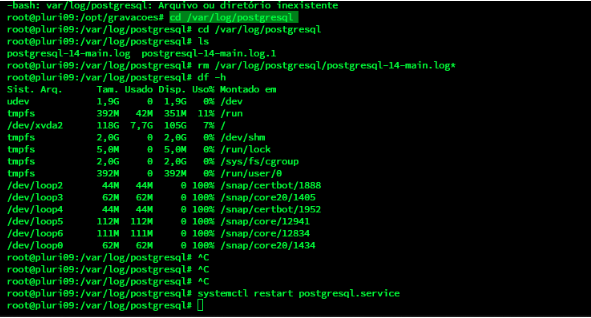
Verifique se há espaço em disco com o comando:
df -h
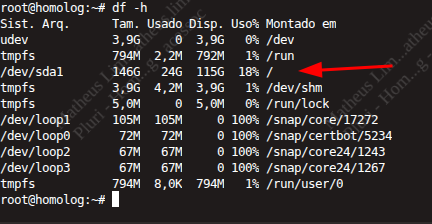
Se tiver 100% você não deve reiniciá-lo antes limpar espaço em disco.
Quando for limpo, você pode reiniciar com o seguinte comando:reboot now
Verifique se subiu os serviços adequadamente.
Reiniciar os serviços
Para reiniciar o serviços, você deve usar os seguintes comandos:
- irá iniciar postgres, asterisk, janus e apache nessa ordem
systemctl restart postgresql@16-main.service asterisk.service janus.service apache2.service
Depois você deve reiniciar o pm2
pm2 restart all
Reiniciar asterisk
Parar o banco de dados primeiro
service postgresql stop
Reiniciar o asterisk
core restart now
Depois iniciar o banco novamente
service postgresql start
Reiniciar Postgres
Reiniciar o serviço do PostgreSQL (Banco de dados)
systemctl restart postgresql.service
OU
service stop postgresql
service start postgresql